


Лучший Ответ COBETHIK , 19 January 2015 - 12:40
Так, понял, лез в дебри. Решилось проще. Вывел через item link.
Денис, спасибо за уделенное время!
Перейти к сообщению


Лучший Ответ COBETHIK , 19 January 2015 - 12:40
Так, понял, лез в дебри. Решилось проще. Вывел через item link.
Денис, спасибо за уделенное время!
Перейти к сообщению
 Тема закрыта

Отправлено 15 January 2015 - 16:56
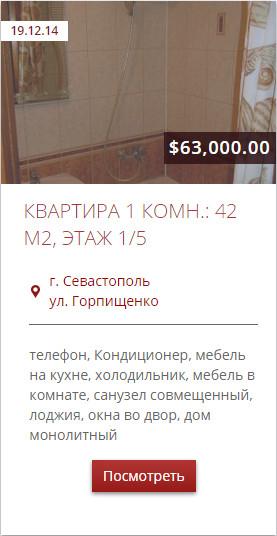
Вечер добрый! Прошу помочь разобраться с выводом кнопки в тизере
zoo/elements/itemname/itemname.php потом в position.config сделал новый position
"title2":  {
   "0":  {
    "showlabel": "0",
    "altlabel": "",
    "link_to_item2": "1",
    "element": "_itemname"
   }
  },
зарегистрировал его в products/positions.xml и вывел в teaser.php
Какое-то время работало, после добавления в шаблон тизера в админке поля Адрес - кнопка отображаться перестала
должно быть так:
Сообщение отредактировал COBETHIK: 15 January 2015 - 16:57
Отправлено 16 January 2015 - 07:06
— Есть два типа людей: Кто еще не делает бекапы и кто уже делает бекапы.
Отправлено 16 January 2015 - 12:27
Покажите код teaser.php
<div class="row-fluid">


	<?php if ($this->checkPosition('image')) : ?>
		<div class="span12 item-image align-center">
			<?php echo $this->renderPosition('image'); ?>
			<?php if ($this->checkPosition('price')) : ?>
			<div class="price_1">
				<?php echo $this->renderPosition('price'); ?>
			</div>
			<?php endif; ?>
			<div class="item-date"><?php echo $this->renderPosition('date', array('style' => 'block')); ?></div>
		</div>
	<?php endif; ?>
		<div class="clear clr"></div>

	<div class="product-teaser-wrapper">
	<?php if ($this->checkPosition('title')) : ?>
		<h3 class="item-title"><?php echo $this->renderPosition('title'); ?></h3>
	<?php endif; ?>
	<div class="clear clr"></div>
	<div class="span12 opis">
		<div class="gorod"><span class="ic"><?php echo $this->renderPosition('gorod', array('style' => 'block')); ?></span></div>
		<!--<div class="ploshad"><span class="ic"><?php echo $this->renderPosition('ploshad', array('style' => 'block')); ?> /Кв. М. </span></div>-->

	<hr/>
	<div class="opis">
		<?php if ($this->checkPosition('opis')) : ?>
			<?php echo $this->renderPosition('opis'); ?>
		<?php endif; ?>
	</div>
	<div class="to-item">
		<?php echo $this->renderPosition('title2'); ?>
	</div>
	</div>
	<div class="clear clr"></div>


	</div>

</div>
positions.xml
    <positions layout="teaser">
        <position name="title">Title</position>
	<position name="area1">Area1</position>
	<position name="area2">Area2</position>
	<position name="area3">Area3</position>
	<position name="lvl1">Lvl1</position>
	<position name="lvl2">Lvl2</position>
        <position name="price">Price</position>
        <position name="date">Date</position>
        <position name="image">Image</position>
	<position name="ploshad">ploshad</position>
        <position name="gorod">gorod</position>
        <position name="opis">opis</position>
	<position name="likes">Likes</position>
	<position name="title2">title2</position>
    </positions>
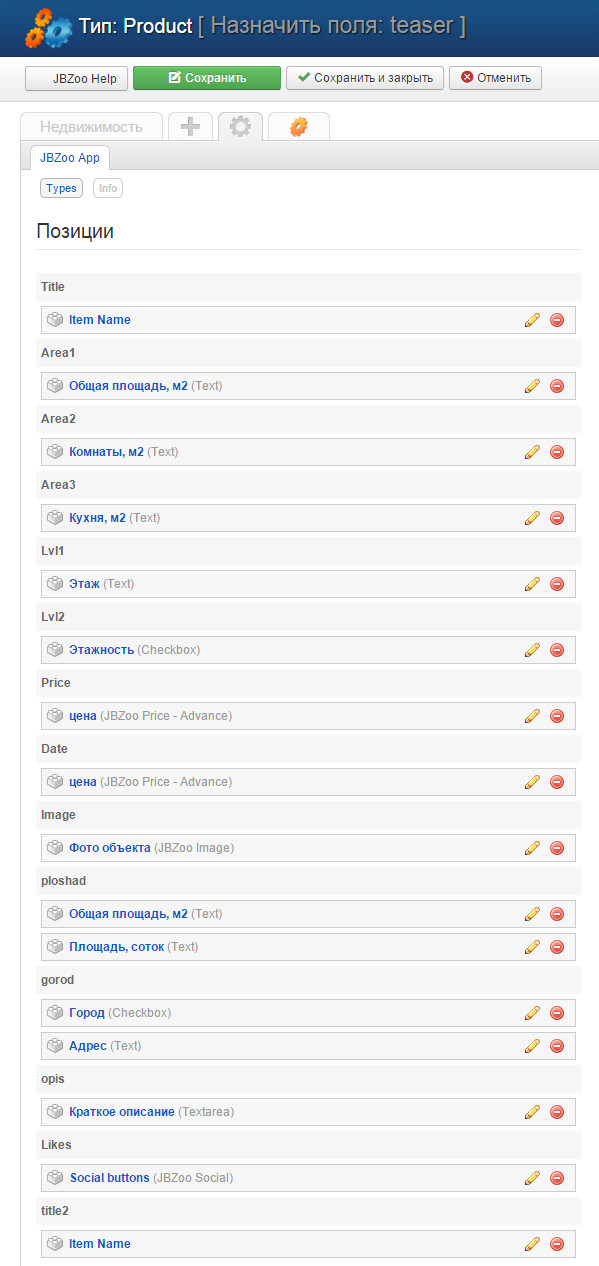
а так же скриншот настроек элемента
Отправлено 19 January 2015 - 07:20
— Есть два типа людей: Кто еще не делает бекапы и кто уже делает бекапы.
Отправлено 19 January 2015 - 12:24
Кажется у вас был изменен xml файл
media\zoo\elements\itemname\itemname.xml
т.е в оригинальном варианте нет опции "link_to_item2", а есть "link_to_item"
xml файл не трогал
в media\zoo\elements\itemname\itemname.php добавил код:
	public function render($params = array()) {
		if (!empty($this->_item)) {

			$params = $this->app->data->create($params);

			if ($params->get('link_to_item', false) && $this->_item->getState()) {

				return '<a title="'.htmlspecialchars($this->_item->name).'" href="' . $this->app->route->item($this->_item) . '">' . $this->_item->name . '</a>';

			}  elseif ($params->get('link_to_item2', false) && $this->_item->getState()) {

				return '<a class="button-red" title="'.$this->_item->name.'" href="' . $this->app->route->item($this->_item) . '">Посмотреть</a>';

			} else {

				return $this->_item->name;

			}
		}
	}
Отправлено 19 January 2015 - 12:40 Лучший Ответ
Так, понял, лез в дебри. Решилось проще. Вывел через item link.
Денис, спасибо за уделенное время!


Community Forum Software by IP.Board
Лицензия зарегистрирована на: JBZoo Support Forum



